Check Environmental Sensor Alerts
You can view recent alerts generated by environmental sensors in the Command Center. Alerts indicate unusual or potentially harmful environmental conditions detected by the sensors.
To Check Environmental Sensor Alerts
- Go to Administration in the main menu.
- Select Command Center from the dropdown.
- In the Environmental Sensors Command Center, click the Alerts tab. The alert list will show the type, device, and timestamp for each alert.
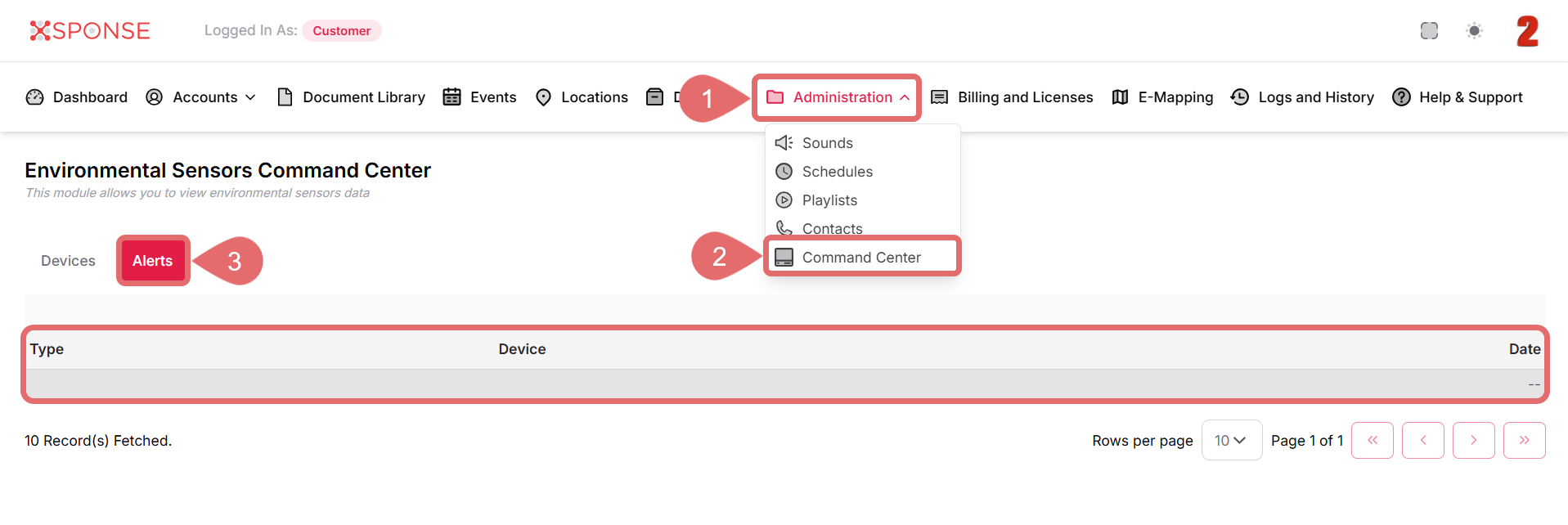
If no alerts have been triggered recently, the list may appear empty or show --.
No Alerts Yet?
If you don’t see any alerts, it may be because no thresholds have been exceeded recently. Make sure sensor thresholds are configured correctly.
See Also
To complement your knowledge of this process, check the following pages: